
Whenever I think of a new business idea, one of my first steps is to secure its domain name. That’s how essential I believe it is. Because of this, I currently own around 14 domains – and that number continues to climb. In this post, I’ll address your top questions, like “What exactly is a domain?”, “How does a domain function?”, and “How can I get one?” By the end, you’ll be prepared to set up your own business website.
What is a domain?
What does a domain look like?
What is a domain name?
Parts of a Domain Name
What is a domain name example?
Domain Name vs. URL
Internet Domain vs. Network Domain
What are domains used for?
Types of Domains
Who manages domain names?
What is a domain? The starting point for your website visitors’ journey
What is a domain?
A domain is the series of characters a user enters in their browser to locate your website. It converts a website’s numerical IP address into an easier-to-read format. Every website has at least one IP address, a numerical sequence that identifies the server hosting the website’s data. For instance, lorepearl.com’s IP address is 115.187.18.37. But trying to remember a unique IP address for each website you visit would be inconvenient.
A domain name links to a website’s IP address, allowing users to remember and locate a site more easily. With the domain, the browser can still access the exact web server hosting the site through its IP address.
I think of my website’s domain like my home address. My friends don’t remember my house’s GPS coordinates. Instead, when they want to come by, they just type my street address into their phones.
It’s the same with a website: instead of memorizing an IP address, visitors simply type the domain into their browser.
What does a domain look like?
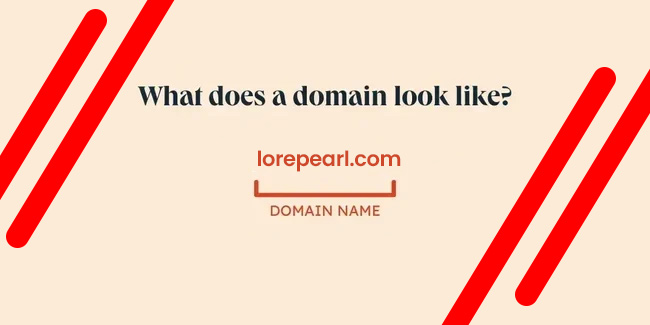
A domain generally includes two or three words separated by dots. A basic example of a domain is lorepearl.com
What is a domain name?
A “domain name” is the same as a “domain,” and can also be called an “internet domain” or “web domain.” These terms all mean the same thing and are used interchangeably.
A domain name’s maximum length, excluding its extension (like “.com”), is 63 characters, while its minimum length is one character.
For a quick explanation of what a domain name is and its components, check out this video from Elegant Themes.
https://www.youtube.com/watch?v=XHOmBV4js_E
Parts of a Domain Name
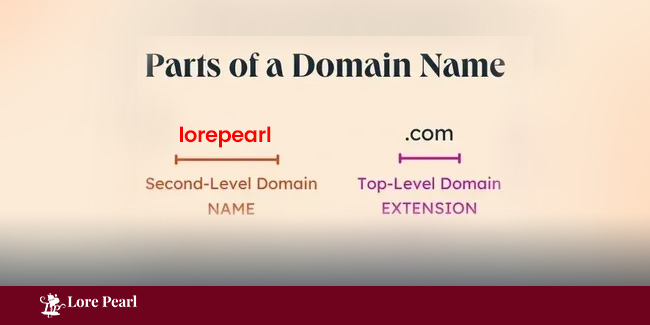
A domain typically has two parts: the second-level and the top-level.
Second-Level Domain (SLD)
The second-level domain is the section of your domain that appears just before “.com” or another extension. For example, in lorepearl.com, the second-level domain is “lorepearl.” When selecting a domain, aim to keep it brief and memorable to make it easy for people to locate.
Top-Level Domain (TLD)
The top-level domain, or TLD, is the extension that follows your second-level domain, signaling the type of organization you represent. For instance, LorePearl uses “.com” as its TLD, reflecting its status as a commercial entity in the United States.
Many U.S. businesses use “.com” for their websites. In fact, data from Verisign shows that .com was the largest TLD in 2023, with 159.6 million registered domain names.
Other TLDs include “.edu” for accredited post-secondary schools, “.gov” for government entities, and “.org” often used by nonprofits.
What is a domain name example?
One example of a domain name is usps.com, which includes a second-level domain (“usps”) and a top-level domain (“.com”).
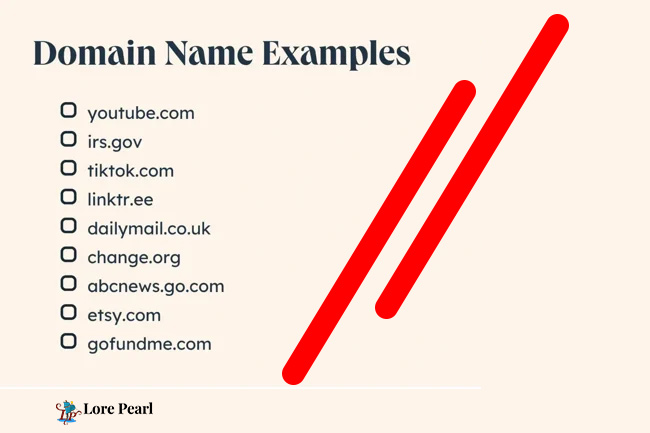
Additional popular domain names are:
youtube.com
irs.gov
harvard.edu
redcross.org
See more examples in the image below.
These are only a handful of domain name examples — there are literally millions more. Verisign data shows that by the close of 2023, there were more than 359.8 million registered domain names worldwide.
Domain Name vs. URL
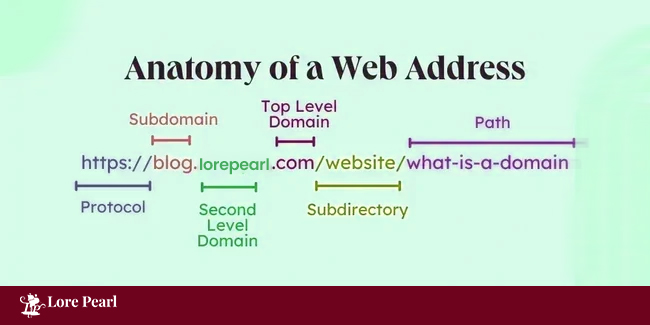
A URL contains your domain, but the domain is just one component of a URL. A URL, or web address, usually consists of a protocol, domain name, and path.
For instance, the URL for this blog post is https://blog.lorepearl.com/service/what-is-a-domain. It’s structured with:
Protocol (“https://”)
Domain name (“blog.lorepearl.com”), which includes a subdomain (“blog.”), a second-level domain (“lorepearl”), and a top-level domain (“.com”)
Subdirectory (“/website/”)
Path (“/what-is-a-domain”)
Internet Domain vs. Network Domain
The internet domain is the type of domain I’m referring to in this article. When I want to visit HubSpot’s website, I type in “hubspot.com” instead of a series of numbers because I recognize HubSpot’s internet domain.
The Domain Name System (DNS) is responsible for converting internet domain names into IP addresses so browsers can access the correct web pages.
A network domain, however, refers to something entirely different. It’s a collection of interconnected devices, such as desktops, printers, and servers, that share a common purpose.
Typically, an administrator oversees managing these devices within the network. Users within a network domain can interact with each other, but their access levels often vary depending on their role.
What are domains used for?
Domains not only make it easier for visitors to find your website, but they also serve many other important purposes. Below, I’ll explore several additional reasons why domains are essential.
- Claiming Ownership
Registering a domain is like securing a piece of internet real estate. As long as you have it registered, no one else can take ownership of it. - Strengthening Brand Identity
A domain name helps create a unified online brand identity. For instance, when a visitor navigates from my website’s homepage to my blog and then to my knowledge base, they’ll notice that the core domain name stays the same.
This consistency supports other brand elements, like color scheme and typography.
- Building Trust
A domain name that matches your company name helps your website appear more credible and professional to visitors. This increases trust, making them more likely to take actions such as submitting a form or survey on a page with that same domain name.
For instance, if you wanted to create a free business website, you could opt for WordPress.com and choose the free subdomain mycompanyname.wordpress.com. However, to present a more professional image, you could purchase the custom domain name mycompanyname.com.
Pro tip: You can create a website (no coding necessary) using Content Hub and link a custom domain at no additional cost.
- Enhancing Recall
Make your domain easy to remember so visitors can quickly type it into their browser, which leads to more direct traffic.
For example, T-Bones Great American Eatery has a short and catchy domain: t-bones.com. This is far easier to remember than a longer alternative like t-bonesgreatamericaneatery.com.
- Differentiating from Competitors
A simple, memorable domain name sets your site apart from competitors with longer or more confusing names. For example, if Google had stuck with its original name, BackRub, it may not have competed as effectively with Yahoo and other search engines.
Increasing Authority
Generally, the older a domain, the more authority it gains, which improves its chances of ranking higher in search results. This is because older domains have had more time to accumulate quality content, internal links, and backlinks. This makes it even more crucial to register a domain as soon as possible!
Types of Domains
Generic Top-Level Domains (gTLD)
Country Code Top-Level Domains (ccTLD)
Internationalized Country Code Top-Level Domains (IDN ccTLD)
Subdomain
To gain a clearer understanding of potential domain names, let’s explore the various types of domains listed below.
1. Generic Top-Level Domains (gTLD)
gTLD refers to the best-known and most broadly used TLDs:
- .com
- .net
- .biz
- .org
- .info
Currently, “.com” is the dominant top-level domain, with 46% of global websites using it as of December 2023. In comparison, the second most popular, “.ru,” is used by just 5% of websites.
2. Country Code Top-Level Domains (ccTLD)
These two-letter TLDs represent specific geographical regions. Here are some of the most common ones:
- .uk (United Kingdom)
- .de (Germany)
- .cn (China)
- .ru (Russia)
- .au (Australia)
- .br (Brazil)
- .nl (Netherlands)
3. Internationalized Country Code Top-Level Domains (IDN ccTLD)
These are domains that can be displayed in non-Latin character sets (e.g., Chinese).
4. Subdomain
A subdomain is a section of a larger domain, positioned before the root domain name (e.g., blog.lorepearl.com). Because it appears to the left of the second-level domain (SLD), it’s also known as a third-level domain (3LD).
Pro tip: With Content Hub, you can link your custom domain to LorePearl at no extra cost. This lets you connect your new domain to hosting, CDN, and security features all in one step.
Who manages domain names?
Several organizations play a role in overseeing domain names. At the top are bodies like the Internet Assigned Numbers Authority (IANA) and the Internet Corporation for Assigned Names and Numbers (ICANN).
These organizations are responsible for setting policies around domain name registrations, accrediting registries, and managing the DNS, though they usually don’t interact directly with the public.
Domain name registrars, such as GoDaddy, Namecheap, and Domain.com, are more familiar to the public. These companies allow you to register available domains for a fee.
For years, I used Google Domains because it was affordable ($12 for a “.com” domain), included domain privacy at no extra cost, and was already integrated with the other Google tools I use for my business.
However, after Google Domains was acquired by Squarespace in 2023, I found the user experience to be less intuitive and more confusing. Additionally, while Squarespace still offers free domain privacy, their domains are priced higher ($20 for a “.com” domain) compared to the previous rate with Google Domains.
Now, I use Namecheap to register my domains. It’s cost-effective ($11.28 for a “.com” domain) and provides domain privacy for free.
Understanding Domains: The First Step in Your Website Visitors’ Journey
By now, you should understand why I prioritize registering domain names for my business ideas. A domain is essentially your website’s online address, the entry point for potential customers to find you.
Make sure to register and connect your custom domain to your website, so you can take full advantage of every new business opportunity online.