
ChatGPT is a smart AI tool that can help make blogging simpler and less time-consuming. It uses machine learning and natural language processing to turn short ideas or notes from you into full blog posts.
Besides writing, ChatGPT can help with many other tasks with ChatGPT 4 Free or paid version, such as brainstorming new ideas, researching keywords, and even analyzing your competitors’ actions. However, it can sometimes seem tricky to use because its responses can be unexpected.
To help you use ChatGPT more effectively, we’ll guide you on How to Use ChatGPT to write a blog post. We’ll also share some helpful prompts for different blogging steps, from planning your content to marketing it. In this article, readers will learn how to leverage ChatGPT as an AI writing assistant to create compelling, high-quality blog posts efficiently.
How to Use ChatGPT to write a blog post 2024

Let’s dive into how to use ChatGPT to write a blog post.
1. Plan Your Content
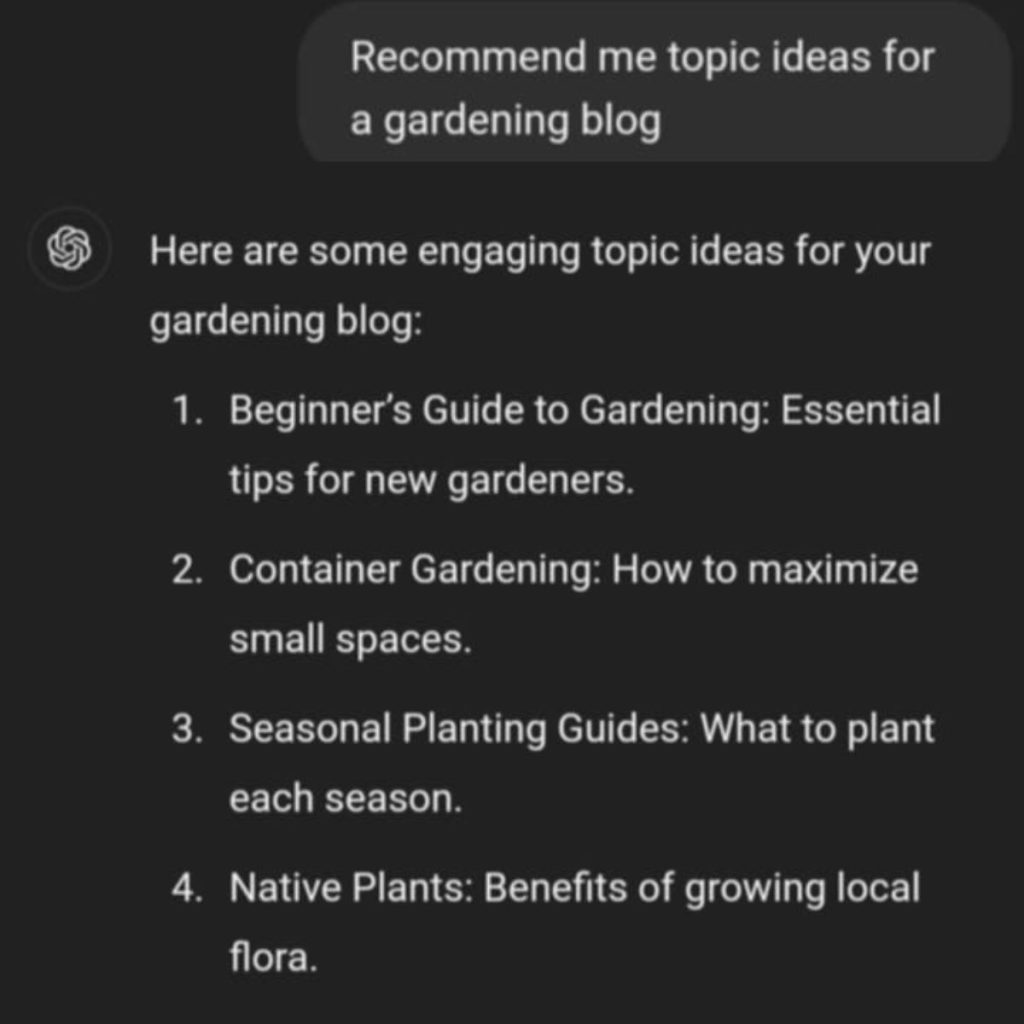
Start by deciding on your ChatGPT blog’s main topic or niche and who you want to read it like your target audience. Choosing a popular topic you’re excited about will make writing more fun and help attract readers.
Some popular blog topics include health, fitness, tech, gaming, travel, and food. Once you’ve chosen a niche, you can ask ChatGPT to help brainstorm specific content ideas and topics within that area.
Choose the concepts you like best, then turn them into detailed sub-topics and blog post headings or titles. With ChatGPT’s variety of suggestions, you can use these ideas to build a content list for the ChatGPT blog.
Best Prompts to Try
“Suggest some blog topic ideas for a [niche] blog.”
“List sub-topics related to [topic].”
“Come up with a blog post title about [sub-topic].”
2. Keyword research

Keyword research means finding the terms people use in search engine results that they are seeking and keyword research is king for writing a blog post. This is crucial to search engine optimization (SEO) to help your content reach the right audience.
Rather than looking up keywords individually, you can use ChatGPT to generate a list of them based on your ChatGPT blog post’s title. Be sure to specify whether you want short or long-tail keywords for better results. However, remember that ChatGPT doesn’t provide data like search volume, trends, or keyword difficulty, which are important for ranking well in search engine results.
For a complete keyword strategy, it’s helpful to use an SEO tool alongside ChatGPT. Free tools like Google Search Console can provide the extra data you need.
Best Prompts to Try
“Make a list of short-tail keywords for the blog post [title].”
“Suggest long-tail keywords for the blog post [title].”
3: Competitor Content gap analysis

In SEO, competitor analysis means looking at what top-ranking posts are doing well, including their keywords, content quality, and internal links. This helps you find gaps in your ChatGPT blog content so you can improve your SEO strategy and rank in search results.
To do this, ask ChatGPT to list the keywords and backlinks from top-ranking blog articles. You can also request extra topic ideas to help you create high-quality content for your blog.
Best Prompts to Try
Analyze the content gap in [competitor’s post].
List the backlinks utilized in [competitor’s post].
Give the keywords utilized in [competitor’s post].
4. Organize topics into clusters
A topic cluster is a group of related articles on your ChatGPT blog that focus on similar topics and keywords. These clusters provide detailed information on a subject, helping meet what users are looking for more effectively.
With topic collections, you can target a vast range of search intents with a single keyword instead of concentrating on one topic alone. For example, the topics “best beginner cameras” and “best mirrorless cameras” can both connect to the main keyword “best cameras.”
Meeting more search intents helps attract organic traffic and improve your blog’s ranking. Covering related subtopics also strengthens your blog’s structure through internal linking.
ChatGPT can help you organize your keywords into relevant topic clusters. Just be careful not to add too many keywords at once, as this may cause errors. You might also need to try a few times to get the best result.
Best Prompts to Try
“Create topic clusters for the blog post [title] using these keywords: [keyword list].
5. Create a ChatGPT Blog Post Outline
Once you’ve planned your content, it’s time to create a structure for your blog post and organize your ideas around it. When planning the outline, think about these points:
- – Length: Decide how many words each section of your ChatGPT blog post should have.
- – Headings: Determine how many headings you need and what they will cover.
- – Content: Identify what information and keywords to include in each section.
- – Flow: Ensure that each heading connects logically and flows well from one to the next.
ChatGPT can help you create a complete outline using the title as a prompt. You can also specify which keywords to include, and it will suggest headings for those keywords. A simple prompt can quickly generate an outline, but it might be basic. If you want a more tailored structure, you can refine it manually, though that takes extra time.
To get a better outline, it’s helpful to use prompts that include detailed information like the total word count, target audience, style, tone, and format. This gives ChatGPT more context to create a unique outline for the ChatGPT blog.
Best Prompts to Try
“Generate an outline for the blog post [title]. Include relevant keywords in the headings.”
“Outline the blog post [title] with these keywords in the headings: [keyword list].”
6. Produce Full Content
After creating your ChatGPT blog post outline, it’s time to expand each section into full content. Keep in mind that you need to work on each section separately since ChatGPT can only generate about 1000 to 1500 words at a time.
When you input each section, make sure to specify the keywords you want to include. This helps ChatGPT understand the context and place the keywords correctly in the text. While using ChatGPT can save you time in creating SEO-friendly content, be cautious because there could be issues with accuracy and originality. Here are some tips to keep in mind when using an AI content creator:
- Don’t rely completely on AI: Content generated by AI may lack a personal touch and consistency. Use ChatGPT as a tool to help your writing, not as a complete replacement.
- Regenerate outputs: If you’re not satisfied with what ChatGPT provides, you can resend the same prompt to get a different response. This can help you gather more ideas for high-quality content.
- Be specific: The more details you provide in your prompt, the better ChatGPT can produce useful content. Include as much relevant information as you can.
- Manually double-check: AI tools can sometimes produce content that isn’t accurate or original. Always proofread and edit the text before you publish it.
In addition to the written content, adding images can make your ChatGPT blog more interesting and appealing.
Best Prompts to Try
“Create an introductory paragraph for the blog post titled [title].”
“Write a summary for the blog post titled [title].”
“Expand the section titled [heading name] using these keywords: [keyword list].”
7. Frequently Asked Questions should be added

Many blog posts include a Frequently Asked Questions (FAQ) section where authors answer common questions about the topic. While it’s not required, having an FAQ section can be very beneficial:
- User experience: Readers may feel frustrated if they can’t quickly find answers to their questions. A dedicated FAQ section helps them get the information they need right away.
- Search engine snippets: Search engines often pull direct answers from FAQ sections to display as featured snippets. These snippets appear on the first page of search results, which can drive more traffic to your blog.
- Organic search: An FAQ section allows you to target more keywords, especially long-tail keywords. While these keywords may have lower search volumes, they are often more specific and effective for attracting visitors.
- Establish credibility: By answering relevant questions, blog authors can showcase their expertise, helping to build trust and authority in their field.
To create FAQs, simply tell ChatGPT the title of your ChatGPT blog post and how many questions you want. To make sure the questions align with what users are searching for, use an SEO tool for verification. Also, remember to fact-check all the answers since ChatGPT might provide incorrect or inconsistent information. Adding citations or links to reliable sources can also enhance credibility.
Best Prompts to Try
“Create five FAQs about the blog post titled [title].”
8. Search Engine Optimization
Besides optimizing keywords, other important SEO strategies can help your blog appear on the first page of search results. ChatGPT can assist you with the following tasks to speed up the optimization process:
- Meta tags: ChatGPT can help you come up with an SEO-friendly meta title and description based on your ChatGPT blog post’s title. This not only improves how search engines find your content but also gives readers a better idea of what your post is about.
- Schema markup: Schema markup is a type of code that gives search engines extra information about your blog post, such as who wrote it or what kind of content it is. This permits search engines to understand your content better and can make your site stand out in search results.
- Alt text: Alt text describes what’s in your images for search engines. You can use ChatGPT to create alt text by providing a description of the image and the relevant keywords
Internal link suggestions: A powerful internal linking strategy supports search engines to crawl your ChatGPT blog content more effectively, which can improve your rankings. You can ask ChatGPT for a list of other posts on your blog to link to from your current post.
Best Prompts to Try
“Create meta tags for the blog post titled [title].”
“Make a schema markup for the blog post titled [title].”
“Suggest internal links for the blog post titled [title].”
“Create alt text for the image with this description: [image description].”
9. Posts and newsletters on social media can be used to promote
Relying solely on search engines may not be enough to attract readers to your blog. You should also promote your blog through email and social media marketing to bring in more traffic.
ChatGPT can help you create social media content based on your blog post title and suggest relevant hashtags to make it easier for people to find your post. The content will vary in length depending on the social media platform. You can also use a similar approach to write a newsletter for email marketing. ChatGPT will automatically generate the body and subject of the email; you just need to fill in the placeholders.
Best Prompts to Try
“Make a tweet to advertise my blog post titled [title] with relevant hashtags and these keywords: [keyword list].”
“Write a promotional Facebook post for my blog post titled [title], including relevant hashtags and these keywords: [keyword list].”
“Create a newsletter to boost my blog post titled [title] for my subscribers.”
Conclusion
ChatGPT is a powerful tool that helps bloggers create content more quickly. It allows users to automate various tasks in their blogging process, from planning to marketing, using simple inputs. Here’s a quick recap of the tasks you can automate with it:
ChatGPT is a helpful tool for bloggers who want to make content creation easier and faster. It can automate many parts of blogging, from planning to promotion, with just a few simple instructions. For example, bloggers can quickly create a full content plan with ideas, topics, and titles that match their niche. ChatGPT can also help with keyword research, suggesting relevant keywords, and even showing what competitors are doing so bloggers can plan better. It can also organize keywords into groups to reach a wider audience and easily create blog post outlines.
Once the outline is ready, ChatGPT can expand on each part, filling it with keyword-rich content for a complete, SEO-friendly post that includes meta descriptions, titles, links, and structured data. It can even suggest frequently asked questions to boost engagement and attract more readers through long-tail keywords. For promotion, ChatGPT can help bloggers create social media posts and newsletters, making it simple to spread the word and bring in more traffic. By using clear instructions, bloggers can get the most out of ChatGPT, creating high-quality, optimized content with ease. And if you’re starting a new ChatGPT blog from scratch, using an AI website builder can make the process even quicker and easier!
To get the best results, use detailed prompts to give ChatGPT more information. It’s also a good idea to experiment with different prompts and regenerate outputs for the best results.
Remember, AI can also help you create your ChatGPT blog—just choose the right AI website builder for your needs, and you can have your site ready in no time!